
搜索到
3
篇与
的结果
-
 Linux手工编译新版GLIBC库,解决低版本GLIBC库软件运行出错的问题 strings /lib/x86_64-linux-gnu/libc.so.6 |grep GLIBC_首先吐槽一下论坛发帖子的功能,以下原文无法直接发出,带图片的都显示图片格式不正确,无奈之下只能使用这种方式发帖 运行软件的错误信息: Error: /lib/x86_64-linux-gnu/libm.so.6: version `GLIBC_2.29' not found 由于专业版1070自带的GLIBC库为2.28,而软件需要的版本是2.29,所以导致某些软件无法正常使用,可以使用以下方法处理: 1:下载所需版本的glic库源码: wget https://ftp.gnu.org/gnu/glibc/glibc-2.29.tar.bz2 2:安装源码编译所需要的环境: sudo apt install build-essential bison3:编译,安装glibc库: tar xvf glibc-2.29.tar.bz2 cd glibc-2.29 mkdir buildcd build ../configure --prefix=/opt/glibc-2.29 make -j4 sudo make install 4:使用LD_PRELOAD技术运行软件(使用这种方式可以单独指定软件使用指定的库) LD_PRELOAD=/opt/glibc-2.29/lib/libc.so.6 软件全路径 运行一切正常 5:如果需要在桌面或系统菜单中使用这种方法运行软件,需要修改desktop文件的内容,找到Exec一行修改为Exec=env LD_PRELOAD=/opt/glibc-2.29/lib/libm.so.6 软件全路径 运行一切正常编译其他项目时,发现需要更高版本的 glibc,所以尝试编译 glibc-2.40UOS版本:$ uname -aLinux athena-PC 4.19.0-amd64-desktop #7112 SMP Thu Jul 18 18:35:56 CST 2024 x86_64 GNU/Linux glibc版本:https://ftp.gnu.org/gnu/glibc/glibc-2.40.tar.gz 编译过程:$ tar xzvf glibc-2.40.tar.gz$ cd glibc-2.40/$ mkdir build$ cd build/$ ../configure --prefix=/usr/$ make 错误信息:gcc -nostdlib -nostartfiles -r -o /home/athena/glibc-2.40/build/elf/librtld.os '-Wl,-(' /home/athena/glibc-2.40/build/elf/dl-allobjs.os /home/athena/glibc-2.40/build/elf/rtld-libc.a -lgcc '-Wl,-)' \ -Wl,-Map,/home/athena/glibc-2.40/build/elf/librtld.os.mapgcc -nostdlib -nostartfiles -shared -o /home/athena/glibc-2.40/build/elf/ld.so.new \ -Wl,-z,relro -Wl,-z,defs \ \ /home/athena/glibc-2.40/build/elf/librtld.os -Wl,--version-script=/home/athena/glibc-2.40/build/ld.map \ -Wl,-soname=ld-linux-x86-64.so.2/usr/bin/ld: /home/athena/glibc-2.40/build/elf/librtld.os: relocation R_X86_64_PC32 against undefined hidden symbol `__ehdr_start' can not be used when making a shared object/usr/bin/ld: final link failed: nonrepresentable section on outputcollect2: error: ld returned 1 exit statusmake[2]: * [Makefile:1380: /home/athena/glibc-2.40/build/elf/ld.so] Error 1make[2]: Leaving directory '/home/athena/glibc-2.40/elf'make[1]: * [Makefile:484: elf/subdir_lib] Error 2make[1]: Leaving directory '/home/athena/glibc-2.40'make: * [Makefile:9: all] Error 2 错误信息显示 ld 链接器有问题,__ehdr_start不能用于编译共享项目。 原因分析:通过查看GUN Binutils的版本发现,UOS系统默认安装的GUN Binutils版本为2.31.1,与glibc-2.40不匹配,是造成glib-2.40编译安装失败的主要原因。$ ld --version GNU ld (GNU Binutils for Uos) 2.31.1 Copyright (C) 2018 Free Software Foundation, Inc. This program is free software; you may redistribute it under the terms of the GNU General Public License version 3 or (at your option) a later version. This program has absolutely no warranty. 解决方法:编译安装合适的GUN Binutils 1.获取GUN Binutils$ git clone git://sourceware.org/git/binutils-gdb.git或$ wget https://ftp.gnu.org/gnu/binutils/binutils-2.43.1.tar.gz 2.编译安装GUN Binutils$ tar xzvf binutils-2.43.1.tar.gz$ cd binutils-2.43.1/$ ../configure --prefix=/usr/$ make$ make install 注意:如果出现binutils-2.43.1源码中定义的'lseek'与UOS系统/usr/include/unistd.h中定义的'lseek'冲突造成编译错误 libtool: compile: gcc -DHAVE_CONFIG_H -I. -U_ASM -I.. -I. -I./../common -I./../src -I./../../include -Wall -Wno-nonnull-compare -g -O2 -MT iotrace.lo -MD -MP -MF .deps/iotrace.Tpo -c iotrace.c -fPIC -DPIC -o .libs/iotrace.oIn file included from ./../src/collector_module.h:27, from collector.h:29, from iotrace.c:38:iotrace.c:2473:1: error: conflicting types for ‘lseek’ llseek (int fildes, offset_t offset, int whence) ^~/usr/include/unistd.h:338:16: note: previous definition of ‘lseek’ was here extern __off_t lseek (int __fd, __off_t __offset, int __whence) __THROW; ^~~~~make[5]: * [Makefile:624: iotrace.lo] Error 1make[5]: Leaving directory '/home/athena/binutils-2.43.1/gprofng/libcollector'make[4]: * [Makefile:478: all] Error 2make[4]: Leaving directory '/home/athena/binutils-2.43.1/gprofng/libcollector'make[3]: * [Makefile:472: all-recursive] Error 1make[3]: Leaving directory '/home/athena/binutils-2.43.1/gprofng'make[2]: * [Makefile:404: all] Error 2make[2]: Leaving directory '/home/athena/binutils-2.43.1/gprofng'make[1]: * [Makefile:7318: all-gprofng] Error 2make[1]: Leaving directory '/home/athena/binutils-2.43.1'make: * [Makefile:1028: all] Error 2 可将/usr/include/unistd.h中335行16列的'lseek'暂时修改为'llseek'以规避编译错误修改时注意及时备份原文件# cp /usr/include/unistd.h /usr/include/unistd.h.bak修改完的unistd.h的335行应为define llseek llseek 3.编译安装完成后确认GNU Binutils版本信息$ ld --versionGNU ld (GNU Binutils) 2.43.1Copyright (C) 2024 Free Software Foundation, Inc.This program is free software; you may redistribute it under the terms ofthe GNU General Public License version 3 or (at your option) a later version.This program has absolutely no warranty. 至此,glibc-2.40可正常完成编译,编译后在glibc-2.40/build/elf目录下看到编译好的ldd,查看版本信息如下:$ ./ldd --versionldd (GNU libc) 2.40Copyright (C) 2024 Free Software Foundation, Inc.This is free software; see the source for copying conditions. There is NOwarranty; not even for MERCHANTABILITY or FITNESS FOR A PARTICULAR PURPOSE.Written by Roland McGrath and Ulrich Drepper. 但继续安装时发现如下错误:Inconsistency detected by ld.so: dl-call-libc-early-init.c: 37: _dl_call_libc_early_init: Assertion 'sym != NULL' failed! 目前还在继续研究中......
 -
UOS 知识汇总/Linux 知识汇总 UOS创建开机自启程序或脚本通过创建桌面启动程序实现开机自启创建可执行程序或脚本启动文件xx.desktop,文件格式如下[Desktop Entry]Type=ApplicationEncoding=UTF-8Exec=/usr/bin/xx.sh #可执行程序路径Name=xx #程序名称拷贝脚本到/usr/bin目录sudo cp -f xx.sh /usr/bin/chmod a+x /usr/bin/xx.sh设置开机自启动,启动时间为开机输入密码进入桌面的瞬间执行sudo cp -f xx.desktop /etc/xdg/autostart/sudo chmod 644 /etc/xdg/autostart/xx.desktop通过配置rc-local服务实现开机自启uos默认没有开启rc-local服务,所以在创建/etc/rc.local文件,并且向该文件写入开机需要执行的命令是不会生效的,需要先开启并配置rc-local.service服务,以下为配置相关步骤:编辑/lib/systemd/system/rc-local.service文件,在文件结尾添加以下两行代码[Install] WantedBy=multi-user.target lzc@lzc-PC:~$ cat /lib/systemd/system/rc-local.service # SPDX-License-Identifier: LGPL-2.1+ # # This file is part of systemd. # # systemd is free software; you can redistribute it and/or modify it # under the terms of the GNU Lesser General Public License as published by # the Free Software Foundation; either version 2.1 of the License, or # (at your option) any later version. # This unit gets pulled automatically into multi-user.target by # systemd-rc-local-generator if /etc/rc.local is executable. [Unit] Description=/etc/rc.local Compatibility Documentation=man:systemd-rc-local-generator(8) ConditionFileIsExecutable=/etc/rc.local After=network.target [Service] Type=forking ExecStart=/etc/rc.local start TimeoutSec=0 RemainAfterExit=yes GuessMainPID=no [Install] WantedBy=multi-user.target 启动rc-local.service服务并设置开机自启systemctl start rc-local.servicesystemctl enable rc-local.service创建rc.local文件并赋予755的权限,往/etc/rc.local文件中写入开机需要执行的命令即可touch /etc/rc.localchmod 755 /etc/rc.local原文链接:https://blog.csdn.net/zZzZzZ__/article/details/120054678软连接复制在Linux中,使用cp命令复制软链接时,会根据命令行参数的不同而产生不同的结果:如果使用cp -L命令,cp会复制软链接指向的文件,而不是软链接本身。这个选项强制cp遵循软链接指向的路径,而不是复制软链接。如果使用cp -P命令,cp会复制软链接本身,而不是软链接指向的文件。这个选项使cp复制软链接,而不是软链接指向的文件。如果未使用任何选项,cp默认会复制软链接本身,而不是软链接指向的文件。这意味着在复制文件树时,软链接只是简单地被复制到目标目录中,而不会创建新的软链接或复制软链接所指向的文件。总之,如果您要复制软链接指向的文件,使用cp -L命令;如果您要复制软链接本身,请使用cp -P命令。如果您只需要将软链接复制到目标目录中,而不是复制软链接指向的文件,那么默认的cp行为就可以满足您的需求。删除打开的文件比如删除打开的.Makefile_back.swp会产生一个临时文件 .nfs000000007c3595c8000129a0再删除临时文件会提示rm: cannot remove ‘.nfs000000007c3595c8000129a0’: Device or resource busy/usr/sbin/lsof D .nfs000000007c3595c8000129a0lsof: status error on D: No such file or directoryCOMMAND PID USER FD TYPE DEVICE SIZE/OFF NODE NAMEgvim 98377 bennyhe 12u REG 0,46 12288 2083886536 .nfs000000007c3595c8000129a0查询储打开工具的PID, kill -9 98377 强制关闭关工具就可以了。删除当前路径所以空文件夹find ./ -type d -empty -deletefind ./ -type d -empty 查找所有空文件夹根据进程搜索PID同样地,你可以执行命令 ps 附带额外选项来获取某个指定的进程的 PID。例如,你可以使用以下命令来获得 firefox 的 PID。ps -el | grep -i firefox还有 ps -ef | grep gvim | grep bennyhe通过进程ID查询端口占用以上一步骤的sshd进程为例,进程PID为522(如果没有netstat命令,使用 sudo apt-get install net-tools 进行安装)netstat -nap | grep 522运行项目并下载源码1如果是查看root用户进程需要加sudo 指令应该为 :sudo netstat -nap|grep 522————————————————版权声明:本文为CSDN博主「玩转智能机器人」的原创文章,遵循CC 4.0 BY-SA版权协议,转载请附上原文出处链接及本声明。原文链接:https://blog.csdn.net/u011198687/article/details/120825794
-
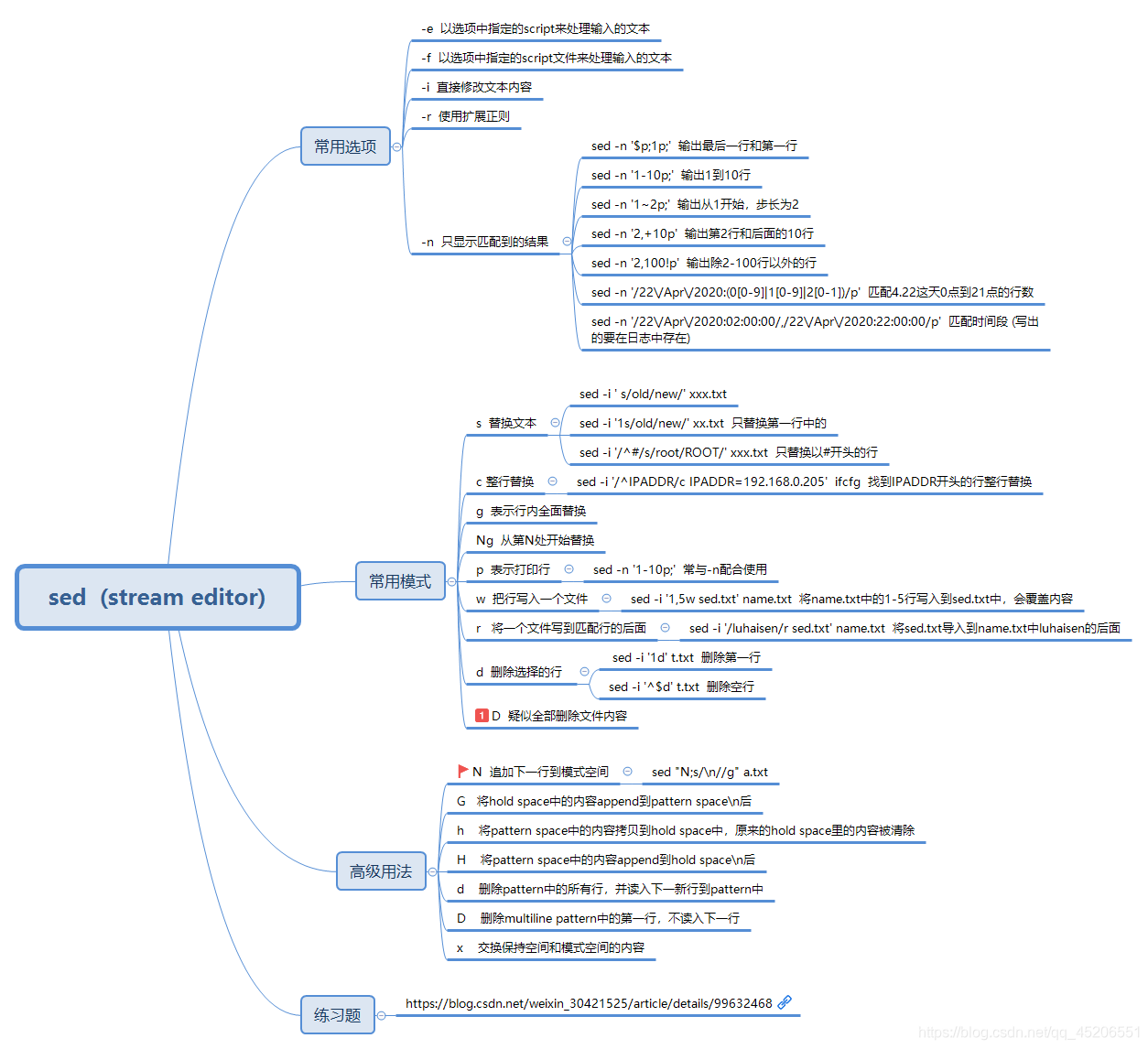
sed 工具使用汇总 Linux sed精确匹配和替换1,问题:现有一text.txt文本内容如下:ni hao ma n yin gn ~~n~~ nin 现要用 'en' 将单个单词 n( 删除线 )替换掉尝试的方法一:sed -i 's/n/en/g' text.txt结果:eni hao ma en yien gen en enien 也就是所有的n字符都被替换,而我希望的是仅仅是单词n(下划线所指)被替换尝试方法二:sed -i 's/ n / en /g' text.txt 在n 和en两边加了两个空格结果: ni hao ma n yin gn en nin 出现的问题是第一行最后一个单词n未被替换网上找了好久,终于找到精准匹配和替换的方法:sed -i 's/\<n\>/en/g' text.txt 结果如下:ni hao ma en yin gn en nin ————————————————版权声明:本文为CSDN博主「yychenxie21」的原创文章,遵循CC 4.0 BY-SA版权协议,转载请附上原文出处链接及本声明。原文链接:https://blog.csdn.net/chenxieyy/article/details/52919009