
搜索到
4
篇与
的结果
-
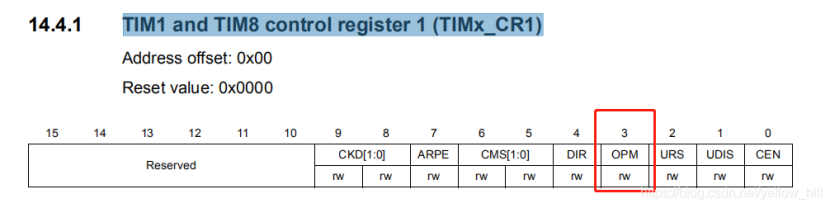
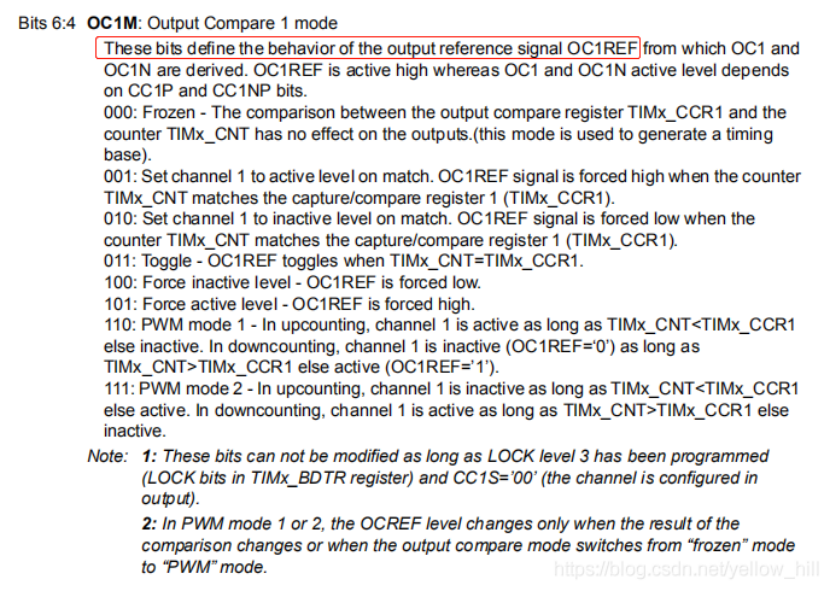
 STM32 - 定时器的设定 -高级- 08 - One-pulse mode - 触发波的实现 - 可变长度和相位 前言:直接开讲,请耐心看完 :首先,OPM模式的波形可以通过主从模式进行触发,其次,OPM模式的波形本身可以进行波形定制。1 OPM定义和功能说明One-pulse mode (OPM) is a particular case of the previous modes. It allows the counter to be started in response to a stimulus and to generate a pulse with a programmable length after a programmable delay.OPM 模式是一个比较特殊的模式,该模型的参数包括:可以定制的长度和Delay(相位)的波形Starting the counter can be controlled through the slave mode controller. Generating the waveform can be done in output compare mode or PWM mode.定时器的触发可以通过主从模式的定时器来控制,而输出波形可以是CC模式或者PWM模式。Select One-pulse mode by setting the OPM bit in the TIMx_CR1 register. This makes the counter stop automatically at the next update event UEV.在TIMx_CR1选择OPM模式使能OPM,同时定时器的计数器在下一个Event UEV停止计数2 OPM设定的定时器通道相关控制寄存器:2.1 OPM-使能-定时器控制寄存器:TIM1 and TIM8 control register 1 (TIMx_CR1)OPM模式,其实就是在一个脉冲波形后暂停计数,就这么简单,后面也方便你定制。Bit 3 OPM: One pulse mode0: Counter is not stopped at update event1: Counter stops counting at the next update event (clearing the bit CEN)2.2 OPM-波形的设定:使能OPM之后,后面就是对OPM的输出波形进行设置:波形的设定,用CC(捕捉比较)的方式, 就是用定时器的计数去比较你的各种设定,然后,各种翻转逻辑,最后实现波形的定制。A pulse can be correctly generated only if the compare value is different from the counter initial value.后面要做的事情就是CNT(counter的计数)和CCRx \ ARR进行比较,当然在比较之前,如下:Before starting (when the timer is waiting for the trigger), the configuration must be:(向上计数的时候)CNT的计数应该小于CCRX或 ARR这样才能产生波形。• In upcounting: CNT < CCRx ≤ ARR (in particular, 0 < CCRx)• In downcounting: CNT > CCRx2.2.1 设定输出波形的细节The OPM waveform is defined by writing the compare registers (taking into account the clock frequency and the counter prescaler).• The tDELAY is defined by the value written in the TIMx_CCR1 register.我们知道CCR为CC模式的比较值,这个值来决定Delay也就是相位• The tPULSE is defined by the difference between the auto-reload value and the compare value (TIMx_ARR - TIMx_CCR1).自动装载值和比较值之间的差值用了决定脉宽• Let us say the user wants to build a waveform with a transition from ‘0’ to ‘1’ when a compare match occurs and a transition from ‘1’ to ‘0’ when the counter reaches the auto-reload value.我们假设我们的波形在CC模式比较匹配时候为高电平翻转,而当定时器计数达到自动装载值的时候为低电平翻转。所谓CC模式比较匹配,就是CNT = CCRx,这时候电平翻转到高,定时器计数达到自动装载值,就是CNT = ARR的时候,高电平变成低电平下图做了一些修改,原图遗失CCR1的横坐标线对于输出的波形有多种选择,To do this, enable PWM mode 2 by writing OC1M=111 in the TIMx_CCMR1 register.111: PWM mode 2 - In upcounting, channel 1is inactive aslongas TIMx_CNTelse active. In downcounting, channel 1is active aslongas TIMx_CNT>TIMx_CCR1 elseinactive.The user can optionally enable the preload registers by writing OC1PE=’1’ in the TIMx_CCMR1 register and ARPE in the TIMx_CR1 register.Bit 3 OC1PE: Output Compare1 preload enable0: Preload register on TIMx_CCR1 disabled. TIMx_CCR1 can be written at anytime, the new value is taken in account immediately.1: Preload register on TIMx_CCR1 enabled. Read/Write operations access the preload register. TIMx_CCR1 preload value is loaded in the active register at each update event.Bit 7 ARPE: Auto-reload preload enable0: TIMx_ARR register isnot buffered1: TIMx_ARR register is bufferedIn this case the compare value must be written in the TIMx_CCR1 register, the auto-reload value in the TIMx_ARR register, generate an update by setting the UG bit and wait for external trigger event on TI2.(STM32手册这里好像有错误,应该是CC2P,不是CC1P)CC2P is written to ‘0’ in this example.In our example, the DIR and CMS bits in the TIMx_CR1 register should be low.Bits 6:5 CMS[1:0]: Center-aligned mode selection 00: Edge-aligned mode. The counter counts up or down depending on the direction bit (DIR).Bit 4 DIR: Direction 0: Counter used as upcounterThe user only wants one pulse (Single mode), so '1’ must be written in the OPM bit in the TIMx_CR1 register to stop the counter at the next update event (when the counter rolls over from the auto-reload value back to 0). When OPM bit in the TIMx_CR1 register is set to '0', so the Repetitive Mode is selected. Particular case: OCx fast enable:OPM模式也可以转成多波复制的模式,只需要OPM 位设为0即可。In One-pulse mode, the edge detection on TIx input set the CEN bit which enables the counter. Then the comparison between the counter and the compare value makes the output toggle. But several clock cycles are needed for these operations and it limits the minimum delay tDELAY min we can get.局限性:就是Delay的最小时间是系统局限的,因为上述信号接入需要一点时间:If the user wants to output a waveform with the minimum delay, the OCxFE bit in the TIMx_CCMRx register must be set. Then OCxRef (and OCx) are forced in response to the stimulus, without taking in account the comparison. Its new level is the same as if a compare match had occurred. OCxFE acts only if the channel is configured in PWM1 or PWM2 mode.注意:要立即响应的得到最小Delay的话,需要使能OCXFE位,改位用来强制OCx对OCXREF的响应加速。这个代价换来的意义是,多了仅仅两个时钟周期的响应时间。For example the user may want to generate a positive pulse on OC1 (输出比较)with a length of tPULSE and after a delay of tDELAY as soon as a positive edge is detected on the TI2 input pin.2.3 设置触发和时钟通道,定时器信号通道选择:Let’s use TI2FP2 as trigger 1:选择触发信号:下图为Timer channel的图我们这样理解定时器通道,定时器通道分成两个部分:输入、输出输入的部分我们看:TI1 、TI2这些都是input,输入通道包括输入滤波(可以滤除小的脉冲)和边沿检测,这样就到了TIxFPx(也就是输入经过滤波和预分频检测后的波形,叫做TI2FP2 Filtered Timer2 Input 2)。然后是,IC1,input capture输入捕捉通道,也属于输入吧,这里又有在预分频后的信号叫,ICx,(每个信号给他定一个名称就是为了后面负责的通道组合做好标识)。然后是,OC,输出比较通道,现在开始算输出通道。在进入输出通道OC之前,要开始做复杂的波形运算,达到我们想要的波形。就必须通过捕捉比较寄存器。通过设定通道的OCXREF、DTG的给到输出通道。• Map TI2FP2 to TI2 by writing CC2S=’01’ in the TIMx_CCMR1 register.将定时器输入通道TI2连接到TI2FP2,实际上是启用了CH2,将通道设定之后,通道的输出也就设定好了。• TI2FP2 must detect a rising edge, write CC2P=’0’ in the TIMx_CCER register.Bit 1 CC1P: Capture/Compare 1 output polarityCC1 channel configured as output:0: OC1 active high1: OC1 active low• Configure TI2FP2 as trigger for the slave mode controller (TRGI) by writing TS=’110’ in the TIMx_SMCR register.准备将TI2FP2作为从控制器的输入:TIM1 and TIM8 slave mode control register (TIMx_SMCR)Bits 6:4 TS[2:0]: Trigger selectionThis bit-field selects the trigger input to be used to synchronize the counter.000: Internal Trigger 0 (ITR0)001: Internal Trigger 1 (ITR1)010: Internal Trigger 2 (ITR2)011: Internal Trigger 3 (ITR3)100: TI1 Edge Detector (TI1F_ED)101: Filtered Timer Input 1 (TI1FP1)110: Filtered Timer Input 2 (TI2FP2)111: External Trigger input (ETRF)• TI2FP2 is used to start the counter by writing SMS to ‘110’ in the TIMx_SMCR register (trigger mode).Bits 2:0 SMS: Slave mode selectionWhen external signals are selected the active edge of the trigger signal (TRGI) is linked to the polarity selected on the external input (see Input Control register and Control Register description.000: Slave mode disabled - if CEN = ‘1’ then the prescaler is clocked directly by the internal clock.001: Encoder mode 1 - Counter counts up/down on TI2FP1 edge depending on TI1FP2 level.010: Encoder mode 2 - Counter counts up/down on TI1FP2 edge depending on TI2FP1 level.011: Encoder mode 3 - Counter counts up/down on both TI1FP1 and TI2FP2 edges depending on the level of the other input.100: Reset Mode - Rising edge of the selected trigger input (TRGI) reinitializes the counter and generates an update of the registers.101: Gated Mode - The counter clock is enabled when the trigger input (TRGI) is high. The counter stops (but is not reset) as soon as the trigger becomes low. Both start and stop of the counter are controlled.110: Trigger Mode - The counter starts at a rising edge of the trigger TRGI (but it is not reset). Only the start of the counter is controlled.111: External Clock Mode 1 - Rising edges of the selected trigger (TRGI) clock the counter.最后,来一个重点中的重点,相位调节示意图:摘自csdn有道云笔记2021-11-16 16:21:47
 -
STM32 - 定时器的设定 - 基础- 07 - 6-step PWM generation - 6步长PWM的产生 - COM Event的解释 前言:本节主要讲互补输出的步长设定问题,同时引入了一个重要的参数COM,这个再诸多STM32的手册里面都过于分散,在本文有一个比较完备的小结: When complementary outputs are used on a channel, preload bits are available on the OCxM, CCxE and CCxNE bits.互补输出主要由以下三个可以预设的设定决定:1 OC1M,OC1通道的输出模式,首先有OC1REF的模式决定,OC1REF会接到OC1 、OC1N然后,在OC1这里进行第二次设置,这里的设置又包括比较复杂的一组设定,有一个表:COM:(COM COMMUTATION交换 EVENT)or (Capture/Compare control update)COM的引入:提到COM之前,我们先看:定时器的控制寄存器2,里面的CCPC,CCUS控制位TIM1 and TIM8 control register 2 (TIMx_CR2)这里控制寄存器的CCPC位,决定了CCP 的 Preloaded的使能,这里定义了COM的2种出现的形式:(COMG bit set or rising edge detected on TRGI, depending on the CCUS bit).而CCUS里面的定义,则是对上述使能做更新的选择:事件产生寄存器TIM1 and TIM8 event generation register (TIMx_EGR)也就是COMGBit 5 COMG: Capture/Compare control update generation1: When CCPC bit is set, it allows to update CCxE, CCxNE and OCxM bitsCCPC预设值使能后,COM的相关使能位可以通过预设先设定好,而这三个通道恰恰就是决定了互补的输出波形,这些预设值在COM的EVENT的时候给到实际的shadow寄存器。The preload bits are transferred to the shadow bits at the COM commutation event. The user can thus program in advance (提前预设)the configuration for the next step and change the configuration of all the channels at the same time.COM can be generated by software by setting the COM bit in the TIMx_EGR register or by hardware (on TRGI rising edge).COM 的EVENT设定值可以是软件设定TIMx_EGR来实现,也可以 由硬件上升沿触发决定。EVENT发生的时候,会更新状态寄存器A flag is set when the COM event occurs (COMIF bit in the TIMx_SR register),Bit 5 COMIF: COM interrupt flagThis flag is set by hardware on COM event (when Capture/compare Control bits - CCxE, CCxNE, OCxM - have been updated). It is cleared by software.0: No COM event occurred.1: COM interrupt pending. 同时也可以产生中断:which can generate an interrupt (if the COMIE bit is set in the TIMx_DIER register) or a DMA request(if the COMDE bit is set in the TIMx_DIER register).Bit 5 COMIE: COM interrupt enable0: COM interrupt disabled1: COM interrupt enabledFigure 91 describes the behavior of the OCx and OCxN outputs when a COM event occurs,in 3 different examples of programmed configurations.Example 1:1 CO1M = 100 : OC1REF 为低电平 预设值2 CC1NE = 0, 那么 OCXN 的互补输出被关闭了3 CC1E = 1,OC1 的输出依据OCXREF的输出,再结合MIX的Table组合:当COM = 1 ,也就是,TIMx_EGR 的 COMG 更新的时候COM EVENT 事件产生,同时更新设置,那么OC1REF force low,OC1的输出被拉倒低电平Example 2:和例子1不同的是,CC1NE的值设为1,这样互补通道打开,同时OC1M设为1,那么OC1REF 被Force to High 给到OC1如果之前OC1REF就是高,那么他是不变的,互补输出通道则由原来的LOW改为和OC1REF一致为高,所有的这些变动,都是在COM TO 1的时候生效,这个和SAMPLE1 一致,仔细看这个例子,前面互补输出的通道都是正常的,到COM TO 1 触发之后,OC1N的通道就一直未低电平了,DISABLE。该例子给出了OC1REF的两个互补波形,而且还带死区的Delay有道云笔记2021-11-16 15:30:49
-
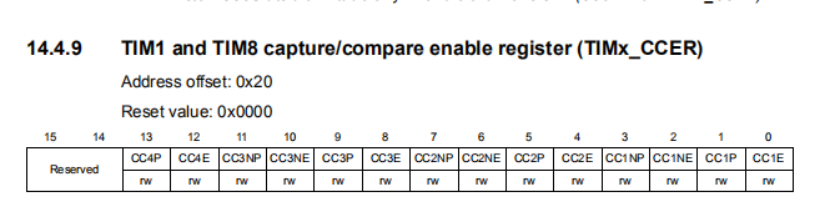
STM32 - 高级定时器的设定 - 基础-05 - 输出波形控制 The advanced-control timers (TIM1 and TIM8) can output two complementary(互补) signals and manage the switching-off and the switching-on instants of the outputs. This time is generally known as dead-time and it has to be adjust it depending on the devices connected to the outputs and their characteristics (intrinsic delays of level-shifters, delays due to power switches...)User can select the polarity of the outputs (main output OCx or complementary OCxN) independently for each output.This is done by writing to the CCxP and CCxNP bits in the TIMx_CCER register.TIMx_CCER 使能控制寄存器,控制CCxP 、CCxNP ,Bit 1 CC1P: Capture/Compare 1 output polarityCC1 channel configured as output:0: OC1 active high1: OC1 active lowBit 3 CC1NP: Capture/Compare 1 complementary output polarity0: OC1N active high.1: OC1N active low.The complementary signals OCx and OCxN are activated by a combination of several control bits:the CCxE and CCxNE bits in the TIMx_CCER registerOC/OCN输出使能控制Bit 0 CC1E: Capture/Compare 1 output enableCC1 channel configured as output:0: Off - OC1 is not active. OC1 level is then function of MOE, OSSI, OSSR, OIS1, OIS1N and CC1NE bits.1: On - OC1 signal is output on the corresponding output pin depending on MOE, OSSI, OSSR, OIS1, OIS1N and CC1NE bits.Bit 2 CC1NE: Capture/Compare 1 complementary output enable0: Off - OC1N is not active. OC1N level is then function of MOE, OSSI, OSSR, OIS1, OIS1N and CC1E bits.1: On - OC1N signal is output on the corresponding output pin depending on MOE, OSSI, OSSR, OIS1, OIS1N and CC1E bits.and the MOE, OISx, OISxN, OSSI and OSSR bits in the TIMx_BDTR TIM1 and TIM8 break and dead-time register (TIMx_BDTR)Bit 15 MOE: Main output enableThis bit is cleared asynchronously by hardware as soon as the break input is active. It is set by software or automatically depending on the AOE bit. It is acting only on the channels which are configured in output.0: OC and OCN outputs are disabled or forced to idle state.1: OC and OCN outputs are enabled if their respective enable bits are set (CCxE, CCxNE in TIMx_CCER register).See OC/OCN enable description for more details (Section 14.4.9: TIM1 and TIM8 capture/compare enable register (TIMx_CCER)).Bit 11 OSSR: Off-state selection for Run modeThis bit is used when MOE=1 on channels having a complementary output which are configured as outputs. OSSR is not implemented if no complementary output is implemented in the timer.See OC/OCN enable description for more details (Section 14.4.9: TIM1 and TIM8 capture/compare enable register (TIMx_CCER)).0: When inactive, OC/OCN outputs are disabled (OC/OCN enable output signal=0).1: When inactive, OC/OCN outputs are enabled with their inactive level as soon as CCxE=1or CCxNE=1. Then, OC/OCN enable output signal=1Bit 10 OSSI: Off-state selection for Idle modeThis bit is used when MOE=0 on channels configured as outputs.See OC/OCN enable description for more details (Section 14.4.9: TIM1 and TIM8 capture/compare enable register (TIMx_CCER)).0: When inactive, OC/OCN outputs are disabled (OC/OCN enable output signal=0).1: When inactive, OC/OCN outputs are forced first with their idle level as soon as CCxE=1 or CCxNE=1. OC/OCN enable output signal=1)Bits 7:0 DTG[7:0]: Dead-time generator setupThis bit-field defines the duration of the dead-time inserted between the complementary outputs. DT correspond to this duration.DTG[7:5]=0xx => DT=DTG[7:0]x tdtg with tdtg=tDTS.DTG[7:5]=10x => DT=(64+DTG[5:0])xtdtg with Tdtg=2xtDTS.DTG[7:5]=110 => DT=(32+DTG[4:0])xtdtg with Tdtg=8xtDTS.DTG[7:5]=111 => DT=(32+DTG[4:0])xtdtg with Tdtg=16xtDTS.Example if TDTS=125ns (8MHz), dead-time possible values are:0 to 15875 ns by 125 ns steps,16 us to 31750 ns by 250 ns steps,32 us to 63us by 1 us steps,64 us to 126 us by 2 us stepsand TIMx_CR2 registers.for more details. In particular, the dead-time is activated when switching to the IDLE state (MOE falling down to 0). Dead-time insertion is enabled by setting both CCxE and CCxNE bits, and the MOE bit if the break circuit is present. DTG[7:0] bits of the TIMx_BDTR register are used to control the dead-time generation for all channels.From a reference waveform OCxREF, it generates 2 outputs OCx and OCxN. If OCx and OCxN are active high:• The OCx output signal is the same as the reference signal except for the rising edge, which is delayed relative to the reference rising edge.(见下面分析)• The OCxN output signal is the opposite of the reference signal except for the rising edge, which is delayed relative to the reference falling edge.(见下面分析)If the delay is greater than the width of the active output (OCx or OCxN) then the corresponding pulse is not generated.The following figures show the relationships between the output signals of the dead-time generator and the reference signal OCxREF. (we suppose CCxP=0, CCxNP=0, MOE=1, CCxE=1 and CCxNE=1 in these examples)CC1P=0 ----> 0: OC1 active high CC1NP =0 ----> : 0: OC1N active high.MOE=1 ----> 1: OC and OCN outputs are enabledCCxE=1 ----> 1: On - OC1 signal is output on the corresponding output pin depending on MOE, OSSI, OSSR, OIS1, OIS1N and CC1NE bits.CCxNE=1 ----> 1: On - OC1N signal is output on the corresponding output pin depending on MOE, OSSI, OSSR, OIS1, OIS1N and CC1E bits.笔者案:我们现在依据上面的这个例子来分析一下:• The OCx output signal is the same as the reference signal except for the rising edge, which is delayed relative to the reference rising edge首先看OCX的输出,他应该是完全和OCXREF的输出一致,除了,上升沿会增加死区延时:蓝色为相同部分,后面上升沿往后移动了一格设定的delay时间。• The OCxN output signal is the opposite of the reference signal except for the rising edge, which is delayed relative to the reference falling edge.(见下面分析)The dead-time delay is the same for each of the channels and is programmable with the DTG bits in the TIMx_BDTR register.delay的时间通过DTG来控制。Re-directing OCxREF to OCx or OCxNIn output mode (forced, output compare or PWM), OCxREF can be re-directed to the OCx output or to OCxN output by configuring the CCxE and CCxNE bits in the TIMx_CCER register.将输出的OCXREF的波形可以转接到OCX 等其他端口,This allows the user to send a specific waveform (such as PWM or static active level) on one output while the complementary remains at its inactive level. Other possibilities are to have both outputs at inactive level or both outputs active and complementary with dead-time.Note: When only OCxN is enabled (CCxE=0, CCxNE=1), it is not complemented and becomes active as soon as OCxREF is high. For example, if CCxNP=0 then OCxN=OCxRef. On the other hand, when both OCx and OCxN are enabled CCxE=CCxNE=1) OCx becomes active when OCxREF is high whereas OCxN is complemented and becomes active whenOCxREF is low.有道云笔记2021-11-15 19:29:53
-
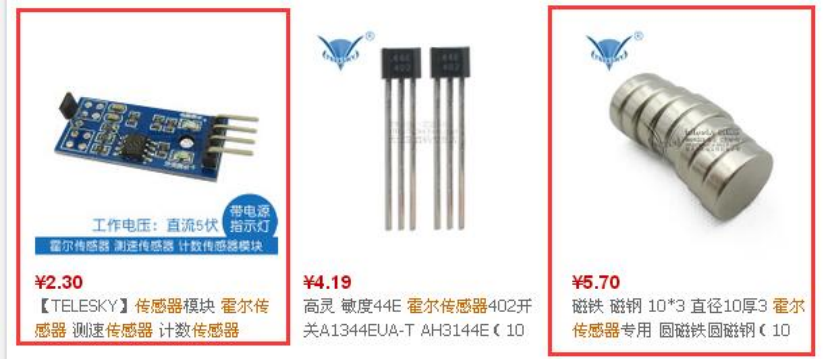
STM32之霍尔传感器模块 一、简介本文介绍如何在STM32上使用霍尔传感器模块。二、实验平台库版本:STM32F10x_StdPeriph_Lib_V3.5.0编译软件:MDK4.53硬件平台:STM32开发板(主芯片stm32f103c8t6)仿真器:JLINK三、版权声明博主:甜甜的大香瓜声明:喝水不忘挖井人,转载请注明出处。原文地址:http://blog.csdn.NET/feilusia联系方式:897503845@qq.com香瓜BLE之CC2541群:127442605香瓜BLE之CC2640群:557278427香瓜BLE之Android群:541462902香瓜单片机之STM8/STM32群:164311667甜甜的大香瓜的小店(淘宝店):https://shop217632629.taobao.com/?spm=2013.1.1000126.d21.hd2o8i四、实验前提1、在进行本文步骤前,请先阅读以下博文:暂无2、在进行本文步骤前,请先 实现以下博文:暂无五、基础知识1、霍尔传感器是什么?答:霍尔传感器是根据霍尔效应制作的一种磁场传感器。用磁铁去靠近霍尔传感器时,霍尔传感器的引脚电平会产生变化。2、霍尔传感器主要用在什么地方?答:霍尔传感器可测速、计数、限位上。举例限位功能:两个霍尔传感器形成45°的夹角,电机边缘粘着一个磁铁,一旦电机转动导致磁铁触发任意其中一个霍尔传感器,则STM32检测到触发后立刻停止电机,不能再继续往此方向转动。以此达到限制电机转动角度的作用。3、本文使用的是什么霍尔传感器模块?答:香瓜买的霍尔传感器模块一共有四个引脚,GND、VCC、D0、A0。其中只需要用到三根线,GND、VCC、D0。(A0不知做啥用的,计数?)使用方法:1)5V供电。2)用跳线连接D0和STM32的IO口(本文连接的是PA11)。3)D0默认是高电平,但磁铁的特定一面(磁铁另一面无用)去靠近霍尔传感器模块时,D0会被拉低。4、霍尔传感器与限位开关有什么区别?答:1)限位开关①优点:无功耗。②缺点:易损坏。2)霍尔传感器①优点:不易损坏。②缺点:有功耗。六、实验步骤1、编写并添加霍尔传感器驱动1)编写驱动GUA_Hall_Sensor.c(存放在“……\HARDWARE”) //****************************************************************************** //name: GUA_Hall_Sensor.c //introduce: 霍尔传感器驱动 //author: 甜甜的大香瓜 //email: 897503845@qq.com //QQ group 香瓜单片机之STM8/STM32(164311667) //changetime: 2017.03.06 //****************************************************************************** #include"stm32f10x.h" #include"GUA_Hall_Sensor.h" /*********************宏定义************************/ //霍尔传感器引脚 #define GUA_HALL_SENSOR_PORT GPIOA #define GUA_HALL_SENSOR_PIN GPIO_Pin_11 //消抖总次数 #define GUA_HALL_SENSOR_DISAPPERAS_SHAKS_COUNT 500000 /*********************内部变量************************/ static GUA_U32 sGUA_Hall_Sensor_DisapperasShakes_IdleCount = 0; //消抖时的空闲状态计数值 static GUA_U32 sGUA_Hall_Sensor_DisapperasShakes_TriggerCount = 0; //消抖时的触发状态计数值 /*********************内部函数************************/ staticvoidGUA_Hall_Sensor_IO_Init(void); //****************************************************************************** //name: GUA_Hall_Sensor_IO_Init //introduce: 霍尔传感器的IO初始化 //parameter: none //return: none //author: 甜甜的大香瓜 //email: 897503845@qq.com //QQ group 香瓜单片机之STM8/STM32(164311667) //changetime: 2017.03.06 //****************************************************************************** staticvoidGUA_Hall_Sensor_IO_Init(void) { //IO结构体 GPIO_InitTypeDef GPIO_InitStructure; //时钟使能 RCC_APB2PeriphClockCmd(RCC_APB2Periph_GPIOA, ENABLE); //霍尔IO配置 GPIO_InitStructure.GPIO_Pin = GUA_HALL_SENSOR_PIN; GPIO_InitStructure.GPIO_Mode = GPIO_Mode_IPU; GPIO_Init(GUA_HALL_SENSOR_PORT, &GPIO_InitStructure); } //****************************************************************************** //name: GUA_Hall_Sensor_Check_Pin //introduce: 霍尔传感器检测触发状态 //parameter: none //return: GUA_HALL_SENSOR_STATUS_IDLE or GUA_HALL_SENSOR_STATUS_TRIGGER //author: 甜甜的大香瓜 //email: 897503845@qq.com //QQ group 香瓜单片机之STM8/STM32(164311667) //changetime: 2017.03.06 //****************************************************************************** GUA_U8 GUA_Hall_Sensor_Check_Pin(void) { //没触发 if(GPIO_ReadInputDataBit(GUA_HALL_SENSOR_PORT, GUA_HALL_SENSOR_PIN) == SET) { //计数 sGUA_Hall_Sensor_DisapperasShakes_IdleCount++; sGUA_Hall_Sensor_DisapperasShakes_TriggerCount = 0; //判断计数是否足够 if(sGUA_Hall_Sensor_DisapperasShakes_IdleCount >= GUA_HALL_SENSOR_DISAPPERAS_SHAKS_COUNT) { return GUA_HALL_SENSOR_STATUS_IDLE; } } //触发 else { //计数 sGUA_Hall_Sensor_DisapperasShakes_IdleCount = 0; sGUA_Hall_Sensor_DisapperasShakes_TriggerCount++; //判断计数是否足够 if(sGUA_Hall_Sensor_DisapperasShakes_TriggerCount >= GUA_HALL_SENSOR_DISAPPERAS_SHAKS_COUNT) { return GUA_HALL_SENSOR_STATUS_TRIGGER; } } return GUA_HALL_SENSOR_STATUS_DISAPPERAS_SHAKS; } //****************************************************************************** //name: GUA_Limit_Switch_Init //introduce: 霍尔传感器初始化 //parameter: none //return: none //author: 甜甜的大香瓜 //email: 897503845@qq.com //QQ group 香瓜单片机之STM8/STM32(164311667) //changetime: 2017.03.06 //****************************************************************************** voidGUA_Hall_Sensor_Init(void) { //初始化IO GUA_Hall_Sensor_IO_Init(); } 2)编写驱动头文件GUA_Hall_Sensor.h(存放在“……\HARDWARE”) //****************************************************************************** //name: GUA_Hall_Sensor.h //introduce: 霍尔传感器驱动的头文件 //author: 甜甜的大香瓜 //email: 897503845@qq.com //QQ group 香瓜单片机之STM8/STM32(164311667) //changetime: 2017.03.06 //****************************************************************************** #ifndef _GUA_HALL_SENSOR_H_ #define _GUA_HALL_SENSOR_H_ /*********************宏定义************************/ //类型宏 #ifndef GUA_U8 typedefunsignedchar GUA_U8; #endif #ifndef GUA_8 typedefsignedchar GUA_8; #endif #ifndef GUA_U16 typedefunsignedshort GUA_U16; #endif #ifndef GUA_16 typedefsignedshort GUA_16; #endif #ifndef GUA_U32 typedefunsignedlong GUA_U32; #endif #ifndef GUA_32 typedefsignedlong GUA_32; #endif #ifndef GUA_U64 typedefunsignedlonglong GUA_U64; #endif #ifndef GUA_64 typedefsignedlonglong GUA_64; #endif //霍尔传感器的触发状态 #define GUA_HALL_SENSOR_STATUS_TRIGGER 0 //霍尔传感器触发 #define GUA_HALL_SENSOR_STATUS_IDLE 1 //霍尔传感器没触发 #define GUA_HALL_SENSOR_STATUS_DISAPPERAS_SHAKS 2 //霍尔传感器消抖中 /*********************外部函数声明************************/ GUA_U8 GUA_Hall_Sensor_Check_Pin(void); voidGUA_Hall_Sensor_Init(void); #endif 3)工程中添加GUA_Hall_Sensor.c4)在MDK设置中添加串口驱动源文件路径2、在应用层中调用1)添加驱动头文件(main.c中)#include"GUA_Hall_Sensor.h"2)添加驱动初始化代码(main.c的main函数中)//霍尔传感器初始化GUA_Hall_Sensor_Init(); 3)添加测试代码①写测试代码(main.c中) staticvoidGUA_Test(void) { U8 nGUA_Ret = 0; U8 nGUA_Stop = 0; while(1) { //检测霍尔当前状态 nGUA_Ret = GUA_Hall_Sensor_Check_Pin(); //检测到霍尔被触发 if(nGUA_Ret == GUA_HALL_SENSOR_STATUS_TRIGGER) { nGUA_Stop = 1; } } ②调用测试代码(main.c的main函数中)//测试代码GUA_Test();七、注意事项暂无。八、实验结果仿真并设置断点在测试代码的“nGUA_Stop = 1;”中,全速运行。用磁铁去靠近模块上的霍尔传感器芯片,模块上的led被点亮表示触发,同时工程中消抖之后会停止在断点处,表示检测到PA11处的霍尔传感器触发导致的低电平。如下图因此实验成功。有道云笔记2021-11-16 17:25:02